01. The Problem: Balancing Cost and Reliability in Cloud Computing
Production workloads demand both cost efficiency and reliability. Cloud providers offer two primary options for compute capacity: spot instances and reserved capacity. Spot instances provide significant cost savings—up to 90% lower than on-demand pricing—but come with the risk of interruption. Reserved capacity, while more expensive, guarantees availability and can offer discounts of 30-70% compared to on-demand pricing. The challenge lies in selecting the right approach for each workload.
Spot instances are ideal for fault-tolerant applications like batch processing, data analytics, or CI/CD pipelines. These workloads can handle interruptions gracefully, often by retrying failed tasks. However, they are unsuitable for mission-critical systems, real-time applications, or databases where downtime would cause financial loss or regulatory violations. For example, a financial trading platform cannot tolerate even brief interruptions, whereas a video rendering farm can easily recover from a spot instance termination.
Reserved capacity is better suited for predictable, long-running workloads such as production databases, APIs, or Kubernetes clusters. The upfront cost and commitment are justified when reliability is non-negotiable. However, reserved capacity may not be cost-effective for short-lived or variable workloads. A startup running a web service with fluctuating traffic might find spot instances more economical, while a large enterprise with steady demand would benefit from reserved capacity.
The decision hinges on workload characteristics. Fault tolerance, cost sensitivity, and regulatory requirements all influence the choice. Spot instances excel where cost is the primary driver and interruptions are acceptable. Reserved capacity is the safer bet for critical workloads where uptime is paramount. The key is understanding these trade-offs to align with business objectives.
02. Key Considerations for Decision-Making
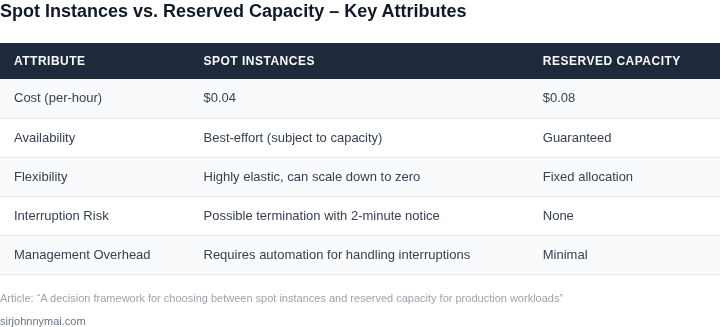
Choosing between spot instances and reserved capacity requires evaluating several key factors. Workload predictability is the first critical consideration. If your application has highly variable demand—such as batch processing or development environments—spot instances can offer cost savings of up to 90% compared to on-demand pricing. However, this approach introduces risk, as AWS can reclaim instances with two-minute notice. For production workloads with strict uptime requirements, reserved capacity provides predictable performance and a 75% discount over on-demand pricing, but it locks you into a one- or three-year commitment.
Budget constraints also play a major role. Reserved capacity requires upfront or partial upfront payments, which may not align with cash-flow-sensitive organizations. Spot instances, on the other hand, charge by the second and can reduce costs by up to 90% for fault-tolerant workloads. However, budgeting becomes more complex due to the unpredictable nature of spot pricing. Tools like AWS Savings Plans or Compute Savings Plans can help mitigate this by offering flexible pricing models that blend reserved capacity and on-demand usage.
Fault tolerance requirements must be carefully assessed. Spot instances are ideal for stateless, interruptible workloads like rendering, data processing, or CI/CD pipelines. If your application can handle interruptions gracefully—such as Kubernetes clusters with pod auto-scaling—spot instances can deliver significant cost savings. Reserved capacity is better suited for stateful workloads requiring consistent performance, such as databases or mission-critical APIs. However, even reserved capacity isn’t immune to failures; you must still implement redundancy and failover mechanisms.
Performance consistency is another factor. Reserved capacity guarantees a specific instance type and performance characteristics, making it suitable for latency-sensitive applications. Spot instances, while often comparable in performance, can experience variability due to underlying hardware. For workloads with strict performance SLAs, reserved capacity provides the stability needed. If performance fluctuations are acceptable, spot instances can still meet requirements at a fraction of the cost.
Finally, consider the operational overhead. Reserved capacity simplifies capacity planning but requires long-term commitment. Spot instances demand more sophisticated orchestration—such as using Kubernetes with spot instance support or AWS Batch—to handle interruptions. If your team lacks expertise in managing spot instances, the operational complexity may outweigh the cost benefits. Reserved capacity, while less flexible, reduces operational risk by providing a fixed, reliable environment.
03. Worked Example: Cost Comparison for a Hypothetical Workload
Consider a data‑processing team of 12 engineers that runs a nightly batch job on Amazon EC2. Each job launches 100 × m5.large instances for eight hours, five days a week. The workload therefore consumes:
- 100 instances × 8 hours = 800 instance‑hours per day
- 800 hours × 5 days = 4,000 instance‑hours per week
- 4,000 hours × 52 weeks ≈ 208,000 instance‑hours per year
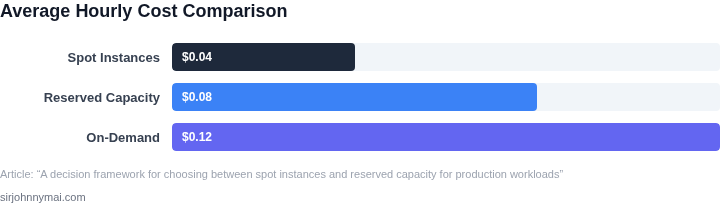
We evaluate two financing models for these 208,000 hours: (1) Spot instances and (2) 1‑year Standard Reserved Instances (no upfront). Pricing is taken from the US‑East‑1 public rate sheet: m5.large On‑Demand $0.096 / hour, Spot $0.030 / hour (≈ 70 % discount), Reserved $0.064 / hour (≈ 33 % discount).
Cost components
Base compute
- Spot: $0.030 × 208,000 = $6,240
- Reserved: $0.064 × 208,000 = $13,312
Interruption mitigation
Spot workloads typically experience a 20 % interruption rate for long‑running batches. To guarantee completion we fall back to On‑Demand for the interrupted portion:
- Interrupted hours = 20 % × 208,000 = 41,600 hours
- On‑Demand fallback cost = $0.096 × 41,600 ≈ $3,994
Capacity buffer
Because Spot capacity can be reclaimed, we provision a 5 % safety buffer (extra instances) that run the full time:
- Buffer hours = 5 % × 208,000 = 10,400 hours
- Spot buffer cost = $0.030 × 10,400 ≈ $312
Observability
Both models use Datadog for metrics and alerts at $15 per host per month. With 100 hosts the annual monitoring cost is:
- Datadog: $15 × 100 hosts × 12 months = $18,000
Annual cost summary
| Component | Spot (USD) | Reserved (USD) |
|---|---|---|
| Base compute | 6,240 | 13,312 |
| Interruption fallback | 3,994 | 0 |
| Capacity buffer | 312 | 0 |
| Datadog monitoring | 18,000 | 18,000 |
| Total annual cost | 28,546 | 31,312 |
The Spot approach saves roughly $2,766 per year, or about 9 % of total spend. The saving stems from the lower per‑hour price, even after accounting for interruption handling and a modest safety buffer.
However, the trade‑off is clear. Spot introduces operational complexity: the team must implement automated fallback logic, monitor termination signals, and validate data integrity after a pre‑emptive shutdown. If the batch job is latency‑sensitive—e.g., must finish before a downstream nightly report—those extra minutes of recovery could violate SLAs.
Reserved Instances eliminate interruption risk entirely and simplify capacity planning. The higher baseline cost is offset by predictability and reduced engineering effort. For workloads where a 20 % interruption rate would trigger costly downstream penalties, Reserved capacity may be the safer choice despite the $2.8 k premium.
In practice, many organizations adopt a hybrid model: reserve a core of 80 % of the required capacity and fill the remaining 20 % with Spot. That mix captures most of the discount while keeping the interruption window small enough to manage without a full fallback to On‑Demand.
04. Decision Framework: A Structured Approach
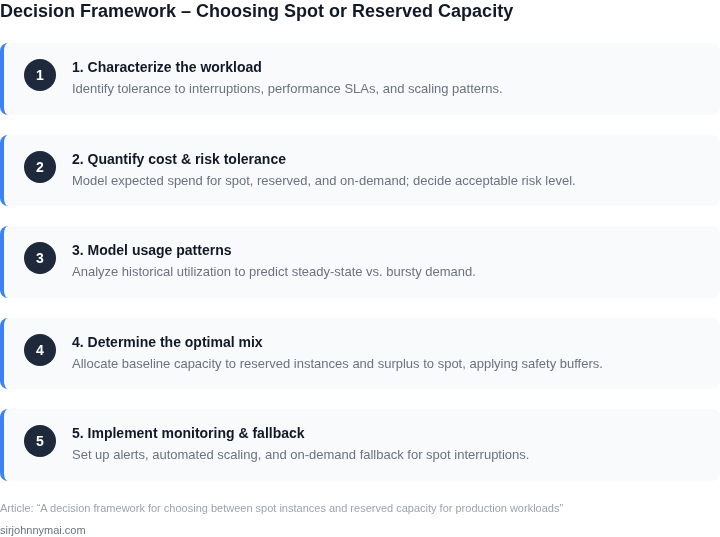
Now that we've established the tradeoffs between spot instances and reserved capacity, let's formalize the decision process. The framework below evaluates three options: AWS Spot Instances, AWS Reserved Instances, and a hybrid approach combining both. Each option is scored based on five key criteria derived from production workload requirements.
| Criteria | AWS Spot Instances | AWS Reserved Instances | Hybrid Approach |
|---|---|---|---|
| Cost Efficiency | High (up to 90% discount vs. on-demand) | Moderate (1-year commitment required) | Balanced (spot for flexible workloads, reserved for critical) |
| Reliability | Low (instances can be interrupted) | High (dedicated capacity, no interruptions) | Moderate (depends on workload distribution) |
| Scalability | High (elastic scaling with Kubernetes) | Moderate (fixed capacity requires manual adjustments) | High (spot for burst, reserved for baseline) |
| Operational Complexity | High (requires fault-tolerant architectures) | Low (predictable performance) | Moderate (hybrid requires orchestration) |
| Use Case Fit | Batch processing, CI/CD pipelines, analytics | Mission-critical services, databases, long-running jobs | Workloads with variable demand (e.g., e-commerce peak hours) |
| Recommendation | Best for cost-sensitive, fault-tolerant workloads | Best for predictable, high-availability workloads | Best for workloads requiring both cost savings and reliability |
This framework serves as a starting point. For example, a Kubernetes cluster running batch jobs might use spot instances for worker nodes, while reserved instances cover the control plane. Monitoring tools like Datadog can track spot instance interruptions to inform adjustments. The hybrid approach requires careful capacity planning but offers the most flexibility.
Ultimately, the choice depends on workload characteristics. Reserved instances are the safest bet for production databases, while spot instances can reduce costs for non-critical tasks. The hybrid model is ideal when you need both reliability and cost savings, but it requires more operational overhead.
05. Action Step: Implementing Your Decision
Now that you’ve evaluated your workload’s cost, reliability, and operational requirements, it’s time to implement your decision. This section provides actionable steps to operationalize your choice between spot instances and reserved capacity.
Step 1: Validate Assumptions with Real Data
Before committing to either option, validate your framework’s assumptions with real-world data. For spot instances, pull your last 90 days of instance interruptions from AWS CloudWatch or Azure Spot VM metrics. For reserved capacity, compare your actual utilization against the reserved hours. Discrepancies here could invalidate your cost model. For example, if your workload has higher-than-expected variability, spot instances might not save as much as projected.
Step 2: Configure Your Infrastructure
If you’ve decided on spot instances, implement a Kubernetes cluster with the spot instance type or use AWS Auto Scaling Groups with spot fleet configurations. For reserved capacity, purchase the appropriate Reserved Instances (RIs) or Savings Plans through the AWS or Azure console. Ensure your deployment scripts or infrastructure-as-code templates (e.g., Terraform, CloudFormation) explicitly reference the chosen pricing model. Avoid manual overrides that could introduce inconsistency.
Step 3: Monitor and Adjust
Deploy monitoring tools like Datadog or Prometheus to track performance and cost metrics. For spot instances, set up alerts for instance interruptions and configure your application to handle these gracefully. For reserved capacity, monitor utilization to ensure you’re not overpaying for unused capacity. Adjust your strategy if actual usage deviates significantly from projections.
Step 4: Document and Communicate
Create a runbook detailing your decision framework, assumptions, and implementation steps. Share this with your team, including DevOps, SREs, and finance stakeholders. Schedule a 30-minute review with your team to align on expectations and troubleshooting protocols. This ensures everyone understands the tradeoffs and can act quickly if issues arise.
Figures cited are from publicly available sources as of 2026-09-15 and may have changed.