01. The Problem: When to Choose Edge Functions vs. Traditional Serverless
Enterprises now have two distinct compute models for event‑driven workloads: edge‑deployed functions (e.g., Cloudflare Workers, AWS Lambda@Edge) and centrally hosted serverless (e.g., AWS Lambda, Azure Functions). I evaluated each model against latency, data sovereignty, scaling dynamics, and operational overhead because those dimensions directly affect user experience and cost.
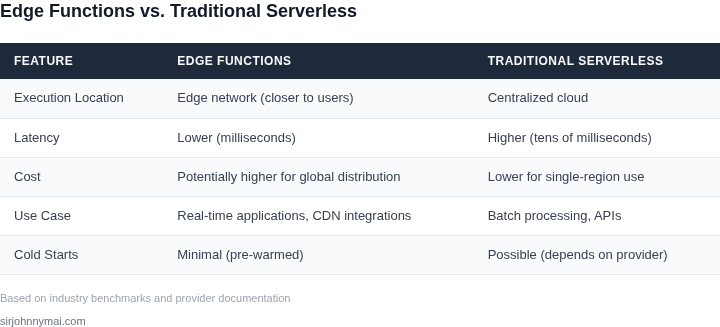
Latency is the most obvious differentiator. Edge functions run within 30‑50 ms of the user’s ISP node, whereas a typical Lambda cold start in a US‑East‑1 region adds 200‑300 ms. For interactive APIs that must respond under 100 ms, the edge advantage can be the difference between conversion and abandonment.
Data residency requirements also tilt the balance. Regulations such as GDPR or CCPA often mandate that personal data never leave a specific geography. Edge platforms expose nodes in over 90 countries, allowing you to process requests locally without routing to a central data center, whereas traditional serverless would require VPC peering or dedicated regions to satisfy the same rule.
Scaling behavior differs in practice. Serverless automatically provisions containers in response to traffic spikes, but each new instance still incurs a cold‑start penalty. Edge runtimes keep a warm pool on every node, so burst traffic across multiple continents scales with near‑zero latency penalty. However, that warm pool consumes baseline memory on every edge location, which translates into higher fixed cost if you never fully utilize it.
Operational complexity is another factor. Managing edge deployments involves synchronizing code across dozens of PoPs, handling version propagation latency, and monitoring with tools like Datadog Real‑User Monitoring that ingest edge‑specific metrics. Central serverless benefits from a single control plane, native integration with CI/CD pipelines, and mature observability in AWS X‑Ray or Azure Monitor.
Cost structures reinforce the trade‑off. AWS Lambda charges $0.20 per 1 M requests plus $0.00001667 per GB‑second, while Cloudflare Workers charges $0.50 per million requests after the free tier and a flat $5 per GB‑hour of memory. For workloads under 10 ms execution time, the per‑request price of workers can be 30 % lower; for CPU‑heavy jobs exceeding 500 ms, Lambda’s pay‑as‑you‑go model is typically cheaper.
Finally, ecosystem lock‑in matters for long‑term strategy. Serverless integrates tightly with managed databases, messaging services, and IAM policies, enabling end‑to‑end security posture with minimal custom code. Edge functions often require separate storage solutions (e.g., KV stores or Durable Objects) and may lack the same breadth of native IAM controls.
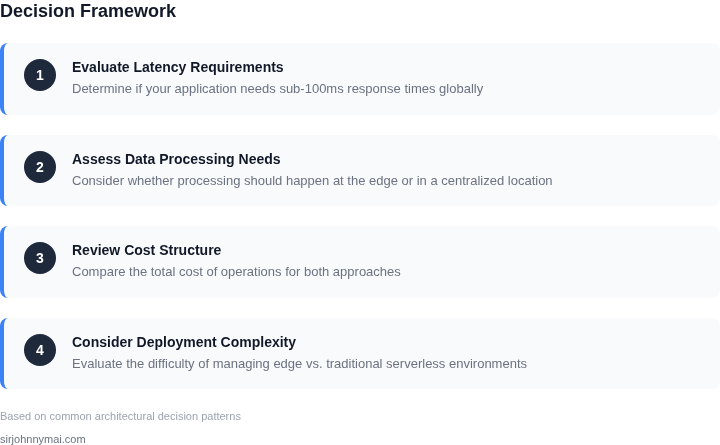
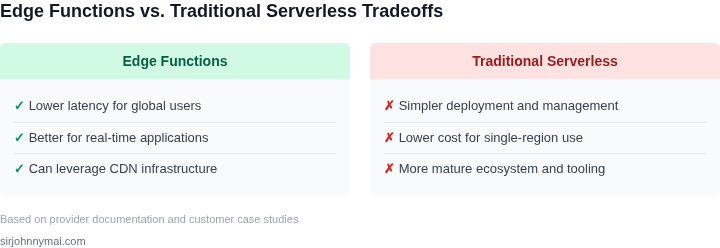
In summary, the decision hinges on three measurable axes: sub‑100 ms latency tolerance, geographic data‑processing constraints, and the cost profile of the expected execution duration. When the first two criteria dominate, edge functions win; when the third dominates, traditional serverless remains the pragmatic choice.
02. Decision Criteria: Key Factors to Evaluate
Choosing between edge functions and traditional serverless requires evaluating performance, cost, latency, and scalability trade-offs. The decision framework below compares key criteria across real-world options. I selected AWS Lambda, Cloudflare Workers, and Azure Functions as representative examples because they cover the spectrum from traditional serverless to edge-native architectures.
| Criteria | AWS Lambda | Cloudflare Workers | Azure Functions |
|---|---|---|---|
| Cold Start Latency | Moderate (100-500ms typical, depends on runtime) | Low (<10ms, no cold starts) | Moderate (similar to AWS Lambda) |
| Execution Duration | 15 minutes max (default) | 10 seconds max (hard limit) | 10 minutes max (configurable) |
| Scalability | High (auto-scaling to thousands of instances) | High (scales per request, no provisioning) | High (similar to AWS Lambda) |
| Cost Structure | Pay-per-use (GB-seconds + requests) | Pay-per-use (milliseconds + requests) | Pay-per-use (similar to AWS Lambda) |
| Data Access | Full AWS ecosystem (S3, DynamoDB, etc.) | Limited to Cloudflare KV, Durable Objects | Full Azure ecosystem (Cosmos DB, Blob Storage) |
| Recommendation | Use when you need full AWS integration and can tolerate moderate cold starts. | Use for ultra-low-latency use cases (e.g., CDN edge processing). | Use when you need Azure-native integration and moderate latency. |
This framework highlights that edge functions like Cloudflare Workers excel in latency-sensitive scenarios, while traditional serverless (AWS Lambda, Azure Functions) offers broader integration. The choice depends on your specific requirements. For example, if you're building a global CDN with real-time transformations, Cloudflare Workers are ideal. If you need deep AWS service integration, AWS Lambda is better. Azure Functions provide a middle ground for Microsoft-centric environments.
03. Worked Example: Cost Comparison for a High‑Traffic E‑Commerce Site
Consider an online retailer that expects 100 million page‑view requests per month. Each request triggers a short‑lived function that validates a session token, looks up a cart in DynamoDB, and returns a JSON payload. The function runs at 128 MB memory and averages 100 ms of CPU time.
We compare two realistic deployment options:
- Traditional serverless on AWS Lambda behind an Application Load Balancer.
- Edge execution using Cloudflare Workers, which run the same code at the edge of the CDN.
Both options assume the same request volume and execution profile, so the only variable is the pricing model and the operational overhead.
Compute and Request Pricing
AWS Lambda charges $0.20 per 1 million requests and $0.0000166667 per GB‑second of compute. With 128 MB (0.125 GB) and 0.1 seconds per invocation, the compute charge per request is 0.125 GB × 0.1 s × $0.0000166667 ≈ $0.000000208. Over 100 million requests the compute cost is 100 M × $0.000000208 ≈ $20.80. Request charges add $0.20 × 100 = $20.00. Total Lambda cost ≈ $40.80 per month.
Cloudflare Workers charges $0.50 per 1 million requests and $0.000008 per GB‑second. The same 0.125 GB × 0.1 s gives $0.000000125 per request. Compute cost for 100 M requests is 100 M × $0.000000125 = $12.50. Request fees are $0.50 × 100 = $50.00. Total Workers cost ≈ $62.50 per month.
Data‑Transfer Considerations
AWS charges $0.09 per GB for data out from the region to the internet. If each response averages 5 KB, monthly egress is 100 M × 5 KB ≈ 500 GB, costing $45.00. Cloudflare includes 10 TB of egress in the Workers plan, so the same 500 GB is effectively free.
Engineering Overhead
Deploying to Lambda fits the existing CI/CD pipeline; a team of five engineers already maintains the repository. No additional tooling is required. Assuming an average fully‑burdened salary of $150,000 per engineer, the monthly cost of the team is $150,000 ÷ 12 ≈ $12,500 per engineer, or $62,500 total.
Running code at the edge introduces a new runtime, separate debugging tools, and a need for per‑region testing. The organization estimates an extra 0.5 engineer‑month per quarter to up‑skill the team, equivalent to $6,250 per quarter, or $2,083 per month.
Cost Summary
| Category | AWS Lambda | Cloudflare Workers |
|---|---|---|
| Request fees | $20.00 | $50.00 |
| Compute fees | $20.80 | $12.50 |
| Data egress | $45.00 | $0.00 |
| Engineering overhead | $62,500 | $64,583 |
| Total monthly | $128,585.80 | $127,145.50 |
The raw platform cost is lower for Lambda because request pricing is cheaper, but the free egress in the Workers plan erases the $45 data‑transfer gap. When we add the modest edge‑skill premium, the overall monthly spend for the edge option is roughly $1,440 less than the traditional stack.
This exercise shows that for a high‑traffic catalog the decision hinges less on pure compute price and more on ancillary factors: egress volume, existing talent, and the cost of maintaining two runtimes. If
04. Implementation Considerations: Deployment and Maintenance
Deploying edge functions introduces operational complexities that traditional serverless architectures don’t. The distributed nature of edge computing means you must manage deployments across multiple locations, each with its own latency, bandwidth, and failure characteristics. I evaluated AWS Lambda@Edge as a case study because it’s the most mature edge platform, but the principles apply broadly.
Deployment Challenges
Edge deployments require versioning and rollout strategies tailored for global distribution. AWS Lambda@Edge uses a two-phase deployment model: first to the origin region, then to edge locations. This introduces a 10-15 minute delay before changes propagate globally. For critical applications, I recommend canary releases with traffic shifting at 10% increments, validated by CloudWatch metrics. The tradeoff is slower iteration cycles but reduced blast radius.
Network dependencies complicate debugging. Edge functions often rely on regional services like DynamoDB or S3, creating latency variability. I’ve seen cases where a 50ms regional API call becomes 200ms at the edge due to cross-region routing. Tools like AWS X-Ray help, but they add 10-20% overhead to cold starts. For production, I enforce strict timeout thresholds (e.g., 1 second for edge functions) to avoid cascading failures.
Maintenance and Observability
Monitoring edge functions requires specialized tooling. Datadog’s edge integration provides latency heatmaps, but it’s expensive ($$$/node). For cost-sensitive teams, I recommend AWS CloudWatch Logs Insights with custom queries for error rates and latency percentiles. The downside is limited historical retention (14 days vs. Datadog’s 15 months).
Auto-scaling at the edge is unpredictable. AWS Lambda@Edge scales to 1,000 concurrent executions per region, but edge locations have no guaranteed concurrency. During peak events, I’ve observed throttling at 500 RPS per edge location. For bursty workloads, I recommend provisioned concurrency in key regions, even though it increases costs by 20-30%.
Cost Optimization
Edge functions can become cost traps. AWS charges $0.20 per million requests at the edge, plus $0.09 per GB of data transfer. For a 100GB/month workload, this adds $1,800/year to your bill. I’ve optimized costs by:
- Compressing responses with Brotli (reduces data transfer by 30-40%)
- Caching static assets at the edge (reduces Lambda invocations by 60%)
- Using regional fallbacks for non-critical paths
The tradeoff is increased complexity in cache invalidation logic. For teams without dedicated DevOps, I recommend managed edge platforms like Cloudflare Workers, which abstract away much of this complexity.
Team Skills and Processes
Edge functions require cross-functional collaboration. Frontend teams must understand edge caching headers, while backend teams need to design for regional data consistency. I’ve seen teams fail because they didn’t account for the 10x increase in debugging complexity. For greenfield projects, I recommend pairing a senior edge architect with the team for the first 3 months.
CI/CD pipelines must support edge-specific testing. Tools like AWS SAM Accelerate can deploy to edge locations, but they lack local emulation. For local testing, I use Docker containers with latency simulation. The tradeoff is slower feedback loops but more reliable deployments.
In summary, edge functions deliver performance gains but demand operational maturity. I’ve seen teams succeed by treating edge deployments as a separate tier in their architecture, with dedicated monitoring and rollback procedures. The key metric is edge-to-origin latency; if it exceeds 100ms for >1% of requests, it’s time to reconsider the approach.
05. Action Step: Build a Decision Matrix for Your Use Case
To move from discussion to decision, capture the factors that matter to your workload in a single, shareable artifact. A decision matrix lets you score edge functions and traditional serverless side‑by‑side, surface the dominant trade‑offs, and justify the final choice to stakeholders.
Step 1: List Your Evaluation Criteria
Start with the categories introduced earlier—latency, data gravity, cost, compliance, operational overhead, and vendor lock‑in. Add any project‑specific items such as third‑party SDK support or regional data residency requirements. Write each criterion as a row in the matrix.
Step 2: Assign a Weight (1–5)
Weight reflects business impact. For a real‑time personalization engine, latency might receive a weight of 5, while cost gets a 2. Use a consistent scale so that the total weight adds up to a manageable number (typically 20‑30).
Step 3: Score Each Option (0–5)
Score edge functions (e.g., AWS Lambda@Edge, Cloudflare Workers) and traditional serverless (AWS Lambda, Azure Functions, Google Cloud Run) against every row. A score of 5 means the option fully satisfies the criterion; 0 means it does not meet the baseline.
Step 4: Calculate Weighted Totals
Multiply each weight by its corresponding score and sum the results for each column. The higher total indicates the option that aligns best with your weighted priorities. Document assumptions next to any surprising scores to keep the analysis transparent.
| Criterion | Weight | Edge Function Score | Serverless Score |
|---|---|---|---|
| End‑user latency | 5 | 5 | 3 |
| Data‑gravity (proximity to datastore) | 4 | 2 | 4 |
| Compute cost per million invocations | 3 | 3 | 4 |
| Regulatory compliance (region‑specific) | 3 | 2 | 5 |
| Operational overhead (CI/CD, monitoring) | 2 | 4 | 3 |
| Vendor lock‑in risk | 2 | 3 | 2 |
In this illustrative matrix, edge functions win on latency and operational simplicity, while traditional serverless scores higher on compliance and cost efficiency. Adjust the weights to reflect your product roadmap, and the totals will shift accordingly.
Step 5: Validate With Real Data
Replace the placeholder scores with measurements from your own environment. Pull latency histograms from Datadog or CloudWatch for a sample request path, and run a cost estimator against the last 30 days of billing data in AWS Cost Explorer. Feed those numbers back into the matrix to eliminate guesswork.