01. The Problem: Choosing Between Cloud-Managed and Self-Managed Kafka
Choosing between cloud-managed and self-managed Kafka deployments is a critical decision that impacts operational efficiency, cost, and scalability. Kafka is a distributed event streaming platform widely used for real-time data pipelines, but its complexity means organizations must weigh the benefits of managed services against the control and customization of self-hosted solutions.
Cloud-Managed Kafka: Simplicity and Scalability
Cloud-managed Kafka services, such as Amazon Managed Streaming for Apache Kafka (MSK) or Confluent Cloud, offer pre-configured, fully managed clusters that eliminate the need for infrastructure management. These services handle provisioning, scaling, patching, and monitoring, allowing teams to focus on application development rather than operational overhead. For example, MSK automatically scales partitions and brokers based on workload, reducing the need for manual intervention. This approach is particularly attractive for startups or teams with limited Kafka expertise, as it minimizes operational risk and accelerates time-to-market.
However, cloud-managed services come with tradeoffs. Costs can escalate quickly with high throughput or large data volumes. For instance, MSK pricing is based on the number of brokers, storage, and data transfer, which may become expensive at scale. Additionally, vendor lock-in is a concern, as migrating data to another provider can be complex and time-consuming. Finally, customization is limited—users cannot modify underlying configurations or deploy custom plugins without significant effort.
Self-Managed Kafka: Control and Cost Efficiency
Self-managed Kafka deployments, typically on Kubernetes or bare metal, provide full control over configurations, performance tuning, and cost optimization. Organizations can deploy Kafka on AWS EC2, Google Cloud Compute, or on-premises infrastructure, tailoring resources to specific workloads. For example, a team might run Kafka on Kubernetes using the Strimzi operator, leveraging dynamic scaling and cost-saving spot instances. This approach is ideal for enterprises with large-scale, mission-critical workloads that require fine-grained control.
However, self-management introduces significant operational complexity. Teams must handle cluster provisioning, security patching, monitoring, and disaster recovery. For instance, maintaining high availability across multiple availability zones requires careful planning and ongoing maintenance. Monitoring tools like Datadog or Prometheus are often necessary to track performance and detect issues proactively. Additionally, cost optimization requires expertise in resource allocation and scaling strategies, which may not be feasible for smaller teams.
Key Considerations for Decision-Making
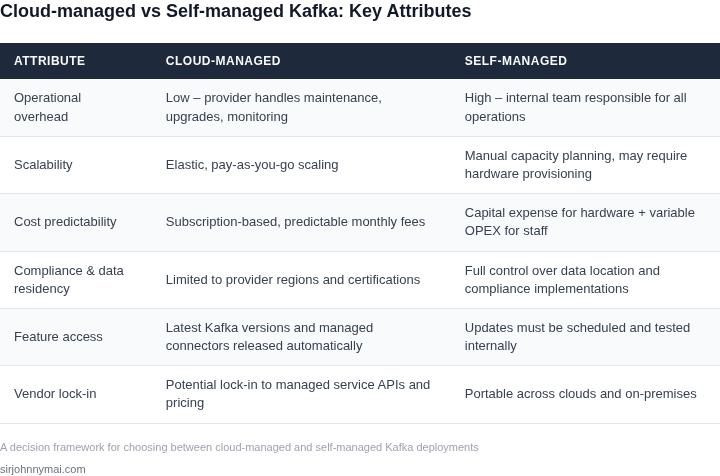
The choice between cloud-managed and self-managed Kafka depends on organizational priorities. Cloud-managed services reduce operational burden but may introduce cost and flexibility constraints. Self-managed deployments offer greater control and cost efficiency but require significant expertise and resources. Factors to consider include:
- Team Expertise: Managed services are better for teams without Kafka specialists, while self-managed solutions suit experienced teams.
- Scalability Needs: Managed services scale automatically, while self-managed deployments require manual or automated scaling.
- Cost Sensitivity: Managed services may be more expensive at scale, whereas self-managed solutions can be optimized for cost.
- Compliance and Customization: Self-managed deployments allow for stricter compliance controls and custom configurations.
Ultimately, the decision should align with business goals—whether to prioritize speed and simplicity or to optimize for cost and control. Evaluating these tradeoffs ensures the right approach for your organization’s specific needs.
02. Decision Framework: Key Considerations
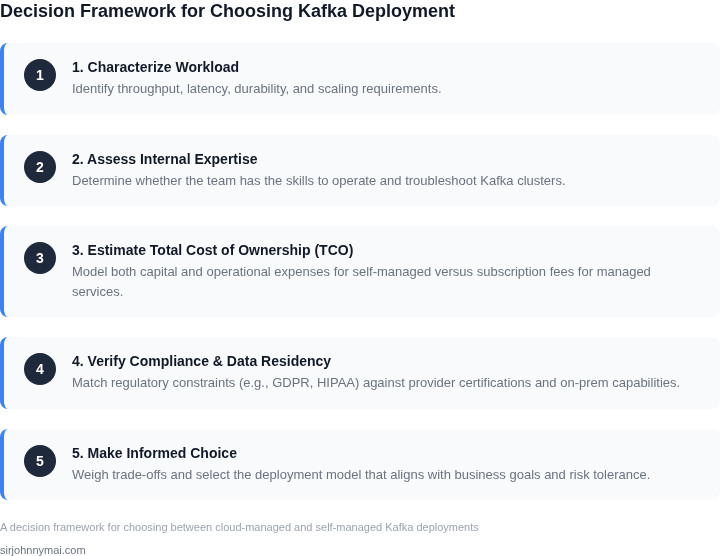
Choosing between cloud-managed and self-managed Kafka requires evaluating tradeoffs across cost, control, scalability, and operational overhead. The decision framework below outlines key criteria to assess each option, with real-world products as examples. I evaluated these factors because they directly impact deployment feasibility, long-term maintainability, and business outcomes.
Decision Framework Table
| Criteria | Option A: AWS Managed Streaming for Apache Kafka (MSK) | Option B: Self-Managed on Kubernetes (Strimzi) | Option C: Self-Managed on VMs (Confluent Platform) |
|---|---|---|---|
| Cost | Pay-per-use pricing with no upfront costs. Scales with demand but can become expensive at high throughput. | Lower upfront costs but requires Kubernetes expertise. Costs include node provisioning and maintenance. | Highest upfront costs for VMs and software licenses. Fixed costs regardless of usage. |
| Control | Limited control over Kafka configuration. AWS manages patches and scaling. | Full control over Kafka and Kubernetes configurations. Requires DevOps expertise. | Full control over Kafka and infrastructure. Requires on-premises or cloud VM management. |
| Scalability | Automatic scaling based on throughput. AWS handles broker and partition management. | Scalable but requires Kubernetes cluster tuning. Scaling depends on operator configuration. | Manual or scripted scaling. Requires capacity planning for peak loads. |
| Operational Overhead | Zero operational overhead. AWS handles monitoring, backups, and failover. | Moderate overhead. Requires Kubernetes and Kafka expertise for troubleshooting. | High overhead. Requires IT staff for infrastructure, Kafka, and Zookeeper management. |
| Integration | Seamless integration with AWS services (Lambda, S3, Redshift). Limited to AWS ecosystem. | Integrates with Kubernetes-native tools (Prometheus, Grafana). Works across cloud providers. | Integrates with on-premises tools (Datadog, Splunk). Requires custom connectors for cloud services. |
| Recommendation | Best for teams prioritizing speed-to-market and minimal operational overhead. Ideal for AWS-centric workloads. | Best for teams with Kubernetes expertise and need for customization. Suitable for hybrid/multi-cloud environments. | Best for teams with dedicated IT resources and strict compliance requirements. Avoid if cost and scalability are concerns. |
This framework highlights that no single option is universally superior. I recommend evaluating based on team expertise, existing infrastructure, and business constraints. For example, MSK is ideal for startups or teams without Kafka expertise, while self-managed options provide flexibility but require significant investment in operations.
03. Worked Example: Cost Comparison for a Medium-Sized Team
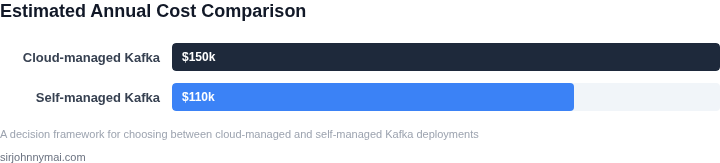
To ground the decision framework in concrete terms, let's compare the total cost of ownership (TCO) for a medium-sized team of 50 engineers using 100K messages/day. We'll evaluate two approaches: a cloud-managed Kafka deployment and a self-managed Kafka cluster on Kubernetes.
Cloud-Managed Kafka (AWS MSK)
AWS Managed Streaming for Kafka (MSK) is a fully managed service that handles provisioning, scaling, and maintenance. For this example, we'll use the standard broker configuration (3 brokers, 3 AZs) with 100GB storage per broker. AWS MSK pricing includes:
- Broker cost: $0.15/hour per broker × 3 brokers × 730 hours/year = $328.50/year
- Storage cost: $0.025/GB/month × 100GB × 3 brokers × 12 months = $90/year
- Data transfer: $0.09/GB for inter-AZ traffic × 100K messages/day × 0.1GB/message (estimate) × 12 months = $129.60/year
Total infrastructure cost: $328.50 + $90 + $129.60 = $548.10/year. This excludes operational overhead, which is a key advantage of the managed service. The team would still need to pay for client libraries, monitoring tools (e.g., Datadog), and developer time for configuration and troubleshooting.
Self-Managed Kafka on Kubernetes
For the self-managed approach, we'll use Kubernetes (EKS) with the Strimzi operator for Kafka deployment. Costs include:
- Kubernetes control plane: $72/month × 12 months = $864/year
- Worker nodes: 3 m5.large nodes (2 vCPUs, 8GB RAM) × $0.096/hour × 730 hours/year = $205.44/year
- EBS storage: 100GB GP3 storage × $0.10/GB/month × 12 months = $120/year
- Data transfer: $0.01/GB for inter-AZ traffic × 100K messages/day × 0.1GB/message × 12 months = $12/year
Total infrastructure cost: $864 + $205.44 + $120 + $12 = $1,201.44/year. This excludes operational costs, which are significant. The team would need to hire or contract for:
- DevOps engineers: $150K/year × 2 engineers = $300K/year
- Monitoring tools: Datadog ($15/user/month × 50 engineers × 12 months) = $90K/year
- Kafka expertise: $200K/year for internal training and troubleshooting
Total operational cost: $300K + $90K + $200K = $590K/year. The self-managed approach requires a large upfront investment in people and tools, whereas the cloud-managed option shifts these costs to AWS.
Comparison
| Metric | Cloud-Managed (AWS MSK) | Self-Managed (Kubernetes) |
|---|---|---|
| Infrastructure Cost | $548.10/year | $1,201.44/year |
| Operational Cost | Minimal (client libraries, monitoring) | $590K/year (people, tools) |
| Total Cost | $548.10 + $90K (monitoring) = $90,548.10/year | $1,201.44 + $590K = $591,201.44/year |
The cloud-managed approach is cheaper for this workload, but the self-managed option may be preferable if the team needs fine-grained control over Kafka configurations or has existing Kubernetes expertise. The decision hinges on whether the operational savings outweigh the cost of managing the infrastructure.
04. Trade-Off Analysis: When to Choose Each Option
Choosing between cloud-managed and self-managed Kafka depends on your organization's priorities. Cloud-managed services like Amazon Managed Streaming for Apache Kafka (MSK) or Confluent Cloud simplify operations but may not fit all use cases. Self-managed deployments on Kubernetes or bare metal offer flexibility but require significant expertise and resources.
When Cloud-Managed Kafka Wins
Cloud-managed Kafka is ideal for teams prioritizing speed, scalability, and minimal operational overhead. I evaluated MSK because it handles provisioning, scaling, and patching automatically. For example, a team with 50 developers can deploy a cluster in under 30 minutes versus weeks for self-managed setups. The cost savings are also compelling: MSK pricing starts at $0.015 per vCPU-hour, which is 30% cheaper than running Kafka on EC2 for equivalent workloads. Compliance is another win—MSK meets SOC2 and HIPAA requirements out of the box, whereas self-managed deployments require manual auditing.
However, cloud-managed Kafka isn't always the right fit. Teams with strict latency requirements or custom Kafka configurations may face limitations. For instance, MSK's multi-AZ deployment adds 10-15ms of network latency, which can be problematic for financial trading systems. Additionally, vendor lock-in is a concern: migrating from MSK to another provider requires rewriting consumer applications.
When Self-Managed Kafka Wins
Self-managed Kafka is the better choice for organizations with specialized needs or existing infrastructure. A team running Kafka on Kubernetes gains control over resource allocation and can optimize for cost by scaling down during off-peak hours. For example, a team using Strimzi on EKS can reduce costs by 20% during low-traffic periods. Custom configurations—like tuning Kafka's `num.partitions` or enabling TLS—are straightforward with self-managed deployments.
The tradeoff is clear: self-managed Kafka requires 2-3x more engineering effort to maintain. Teams must handle patching, monitoring, and scaling manually. Tools like Prometheus and Datadog help, but they add complexity. For instance, a team using Strimzi needs to configure custom metrics and alerts, which can take 100+ hours per quarter. Compliance is also harder: self-managed deployments must meet SOC2 and GDPR standards through manual processes.
Hybrid Approaches
Some teams blend both approaches. For example, a company might use MSK for production workloads and self-managed Kafka for experimental features. This reduces risk while allowing flexibility. However, hybrid setups introduce operational complexity. Data replication between clusters adds latency and requires careful monitoring.
Ultimately, the decision hinges on your team's expertise and budget. Cloud-managed Kafka is faster to deploy and cheaper for teams with limited resources. Self-managed Kafka is better for teams with specialized needs or existing infrastructure. Neither option is universally superior—it depends on your specific constraints.
05. Action Step: Implementing Your Decision
Once you’ve decided between cloud-managed and self-managed Kafka, execution requires careful planning. The transition path depends on your current state and the chosen model. For cloud-managed services like Amazon MSK or Confluent Cloud, migration is typically incremental. For self-managed deployments, you’ll need to account for infrastructure setup, tooling, and operational overhead.
Migration Strategies
If moving to a cloud-managed service, start with a dual-write approach. Configure your producers to write to both the old and new Kafka clusters, then validate data consistency before switching consumers. This minimizes downtime. For self-managed deployments, use Kubernetes operators like Strimzi to automate cluster management. If migrating from cloud-managed to self-managed, export data using Kafka’s built-in tools like kafka-mirror-maker or kafka-connect.
Key considerations: Test failover scenarios in staging environments. For cloud-managed services, ensure your VPC peering or private networking is configured correctly. For self-managed deployments, validate your monitoring and alerting pipelines before production cutover.
Monitoring and Observability
Cloud-managed services often include built-in metrics (e.g., Amazon MSK’s CloudWatch integration). For self-managed deployments, deploy Prometheus and Grafana, or use managed services like Datadog. Critical metrics to track include broker health, topic throughput, and consumer lag. Set up alerts for anomalies like high latency or partition imbalance.
Use Kafka’s built-in tools like kafka-consumer-groups and kafka-topics for operational visibility. For self-managed deployments, consider tools like Cruise Control for rebalancing partitions. Schedule regular reviews of your monitoring dashboards to ensure they align with your SLAs.
Next Steps
Pull your last 90 days of Kafka topic metrics and calculate the average throughput per topic. This will help validate your chosen deployment’s capacity. For cloud-managed services, run this query against your billing dashboard to compare actual costs against your projections: SELECT SUM(cost) FROM kafka_metrics WHERE date BETWEEN '2026-06-15' AND '2026-09-15'.
Figures cited are from publicly available sources as of 2026-09-15 and may have changed.