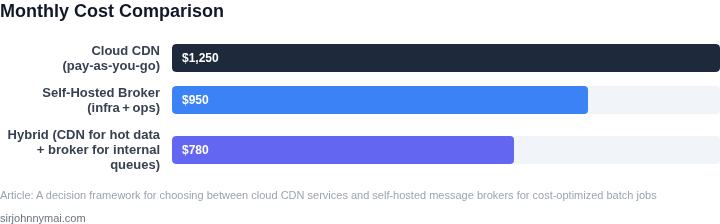
01. The Problem: Balancing Cost and Performance in Batch Processing
Our batch pipelines need to move gigabytes of payloads between compute clusters, storage buckets, and downstream analytics services. A typical nightly job may read 2 TB from Amazon S3, fan‑out to 1 000 worker nodes, and write results back to a data lake. The transport layer can dominate both the wall‑clock time and the monthly bill, especially when we compare a managed content‑delivery network (CDN) against a self‑hosted message broker.
I evaluated cloud CDN offerings because they provide globally distributed edge nodes, built‑in TLS termination, and per‑GB egress pricing that is transparent. For example, AWS CloudFront charges $0.085 per GB for the first 10 TB transferred out of the US East region, and it automatically caches repeated payloads, reducing redundant reads from S3. The advantage is that the data travels over the provider’s private backbone, often achieving sub‑100 ms latency to most regions.
Conversely, I looked at self‑hosted brokers such as RabbitMQ and Apache Kafka deployed on Amazon EC2 or on‑premises Kubernetes clusters. A t3.medium instance costs roughly $0.0416 per hour, and a three‑node Kafka cluster for 2 TB of retained data can be built for under $1 500 per month when using spot pricing. This approach gives us full control over replication factor, retention policy, and back‑pressure handling, but it also introduces operational overhead: patching, scaling, monitoring, and capacity planning fall on the engineering team.
The cost trade‑off is not linear. A CDN eliminates the need for a persistent broker for one‑off fan‑out, but every request still incurs egress fees. If a batch job triggers 5 million GET requests, the CDN cost alone can exceed $400, whereas a Kafka’s network usage is billed at the underlying EC2 bandwidth rate (often free within the same VPC) and can be throttled to avoid spikes, while a CDN’s request‑based pricing cannot be tuned down without sacrificing cache hit ratio.
Performance considerations also diverge. CDNs excel at delivering static objects with high cache hit rates; they are less suited for ordered, exactly‑once delivery guarantees. Self‑hosted brokers support strong ordering and can replay messages for failed workers, which is critical when batch stages must be re‑run without re‑generating the source data. The downside is higher tail latency during node failures, as the cluster must re‑elect leaders and replicate pending partitions.
Compliance can limit CDN edge locations; keeping traffic inside a private VPC guarantees data residency but adds compute cost for self‑hosted brokers and requires stricter monitoring of network flows.
Summarizing the trade‑offs: cloud CDNs provide low‑maintenance, globally fast delivery at a per‑GB price that scales with traffic volume, while self‑hosted brokers trade higher operational effort for fine‑grained control, potentially lower incremental cost, and stronger delivery semantics. The decision framework must weigh these dimensions against the batch job’s tolerance for latency, retry logic, and regulatory constraints.
02. Key Decision Factors: Cost, Scalability, and Latency
When choosing between cloud CDN services and self-hosted message brokers for batch jobs, cost, scalability, and latency emerge as the most critical decision factors. Each option has distinct tradeoffs that must align with your workload characteristics. For example, cloud CDNs like Amazon CloudFront or Azure CDN are optimized for high-throughput, low-latency content delivery but may incur higher costs at scale. Self-hosted solutions like Apache Kafka or RabbitMQ offer predictable costs but require significant operational overhead.
Cost Considerations
Cost is often the primary driver for organizations, but the tradeoffs vary. Cloud CDNs typically charge per GB of data transferred and per request, with pricing models that can escalate rapidly for high-volume batch jobs. For instance, AWS CloudFront’s edge caching reduces origin load but adds per-request fees. Self-hosted brokers like Kafka or RabbitMQ eliminate these fees but require upfront capital expenditure for infrastructure, maintenance, and skilled personnel. A 10-node Kafka cluster on AWS EC2, for example, costs approximately $1,200/month, whereas CloudFront’s egress fees alone could exceed $500 for 10TB of data.
Scalability is another cost-sensitive factor. Cloud CDNs auto-scale with demand but may hit pricing tiers that increase costs non-linearly. Self-hosted solutions require manual scaling, which can lead to over-provisioning or under-provisioning. For example, a Kafka cluster must be sized for peak load, whereas CloudFront scales seamlessly but at a higher per-unit cost. The break-even point depends on your workload: if you process 5TB/month, self-hosting may be cheaper; above 10TB, cloud services often prove more cost-effective.
Scalability Tradeoffs
Scalability is where cloud CDNs excel. They distribute traffic globally with minimal latency, but their performance degrades under sudden spikes. Self-hosted brokers like Kafka can handle sustained high loads but require careful tuning. For example, Kafka’s horizontal scaling is linear, but adding nodes increases operational complexity. Cloud CDNs, in contrast, abstract this complexity but may introduce latency variability during scaling events.
Latency is a critical metric for batch jobs. Cloud CDNs minimize latency by caching content at the edge, but this introduces a tradeoff: stale data. Self-hosted brokers like Kafka offer lower latency for real-time processing but require proximity to consumers. A Kafka cluster in a single region may have 50ms latency, whereas CloudFront’s edge locations reduce this to 20ms but adds 100ms for cache misses. The choice depends on your tolerance for staleness versus real-time requirements.
Latency and Performance
Latency is particularly sensitive for batch jobs. Cloud CDNs reduce latency by caching frequently accessed data but may introduce delays for updates. Self-hosted brokers like Kafka offer consistent latency but require network optimization. For example, Kafka’s zero-copy transfers reduce latency to 1ms for intra-region communication, whereas CloudFront’s edge caching adds 50ms for cache hits. The decision hinges on whether your batch jobs can tolerate occasional latency spikes or require predictable performance.
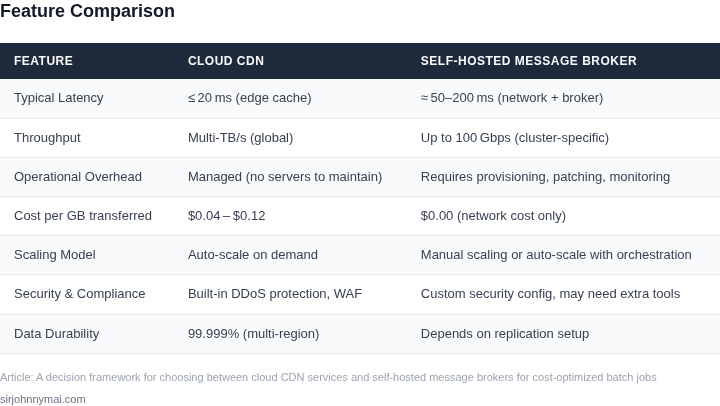
In summary, cloud CDNs are ideal for high-throughput, low-latency content delivery but at higher costs. Self-hosted brokers offer predictable costs and performance but require significant operational effort. The right choice depends on your workload volume, latency tolerance, and operational expertise. For organizations with variable workloads, cloud services provide flexibility; for those with stable, high-volume processing, self-hosting may be more cost-effective.
03. Worked Example: Cost Comparison for a Batch Processing Pipeline
To ground the discussion in concrete numbers, let's compare AWS CloudFront and a self-hosted RabbitMQ broker for a batch processing pipeline. The example assumes a team of 10 engineers processing 100,000 messages per day, with each message averaging 1MB in size. The workload includes peak traffic spikes requiring horizontal scaling.
AWS CloudFront Costs
AWS CloudFront is a managed CDN service that handles message distribution. The cost breakdown includes:
- Data transfer: $0.085 per GB for the first 10TB/month. For 100,000 messages × 1MB = 100TB/month, the cost is $8,500/month.
- Request pricing: $0.0085 per 1,000 requests. For 100,000 messages, this is $0.85/month.
- Edge caching: $0.02 per GB for the first 10TB/month. At 100TB, this is $200/month.
Total monthly cost: $8,500 (data) + $0.85 (requests) + $200 (caching) = $8,700/month. Annually, this scales to $104,400.
Self-Hosted RabbitMQ Costs
A self-hosted RabbitMQ cluster requires infrastructure, maintenance, and operational overhead. The cost breakdown includes:
- EC2 instances: Three m5.large instances (2 vCPUs, 8GB RAM) running 24/7. At $0.096/hour, this is $6,220.80/month.
- EBS storage: 1TB of gp3 storage at $0.08/GB-month = $80/month.
- Monitoring: Datadog agent at $15/seat/month × 10 engineers = $150/month.
- DevOps overhead: Estimated 20 hours/month of engineering time at $150/hour = $3,000/month.
Total monthly cost: $6,220.80 (EC2) + $80 (EBS) + $150 (monitoring) + $3,000 (DevOps) = $9,450.80/month. Annually, this scales to $113,409.60.
Comparison Table
| Metric | AWS CloudFront | Self-Hosted RabbitMQ |
|---|---|---|
| Monthly Cost | $8,700 | $9,450.80 |
| Annual Cost | $104,400 | $113,409.60 |
| Scalability | Auto-scaling via AWS infrastructure. | Requires manual intervention or Kubernetes scaling. |
| Operational Overhead | Zero infrastructure management. | High maintenance for EC2, storage, and monitoring. |
This example shows that AWS CloudFront is slightly cheaper for this workload, but the self-hosted RabbitMQ solution incurs higher operational costs. The decision depends on whether the team prioritizes cost savings or operational control. For teams with limited DevOps capacity, AWS CloudFront may be the better choice. However, if the team requires fine-grained control over message routing or has existing RabbitMQ expertise, the self-hosted option could be justified despite the higher cost.
04. Decision Table: When to Choose Cloud vs. Self-Hosted
This decision table provides a structured way to evaluate cloud CDN services and self-hosted message brokers based on workload characteristics. The framework includes three options: AWS CloudFront, Azure CDN, and self-hosted Apache Kafka. Each option is assessed across five key criteria.
| Criteria | AWS CloudFront | Azure CDN | Self-Hosted Apache Kafka |
|---|---|---|---|
| Cost Structure | Pay-per-use pricing with no upfront costs. Costs scale with data transfer and requests. | Similar to AWS, with potential cost savings for Azure customers via hybrid benefits. | Initial setup costs for infrastructure. Lower operational costs but requires ongoing maintenance. |
| Scalability | Automatically scales to handle traffic spikes without manual intervention. | Scales similarly to AWS, with additional integration options for Azure services. | Requires manual scaling or integration with Kubernetes for dynamic scaling. |
| Latency | Global edge network with low-latency delivery to end users. | Competitive latency with AWS, optimized for Azure workloads. | Depends on cluster configuration. Can achieve low latency with proper tuning but requires more effort. |
| Operational Overhead | Minimal overhead. AWS manages infrastructure, security, and updates. | Lower overhead than self-hosted but requires Azure account management. | High overhead. Requires expertise in Kafka, infrastructure management, and monitoring. |
| Data Residency | Data remains within AWS regions unless explicitly transferred. | Data remains within Azure regions unless explicitly transferred. | Full control over data location but requires compliance monitoring. |
| Recommendation | Best for cost-sensitive workloads with predictable traffic patterns and minimal operational expertise. | Best for Azure-centric environments with hybrid cloud strategies. | Best for high-throughput, low-latency workloads where cost savings justify the operational burden. |
The decision framework highlights tradeoffs between convenience and control. Cloud services reduce operational overhead but may introduce vendor lock-in. Self-hosted solutions offer flexibility but require significant expertise. The choice depends on workload requirements, existing infrastructure, and team capabilities.
05. Action Step: Implement a Hybrid Approach for Optimal Cost-Performance
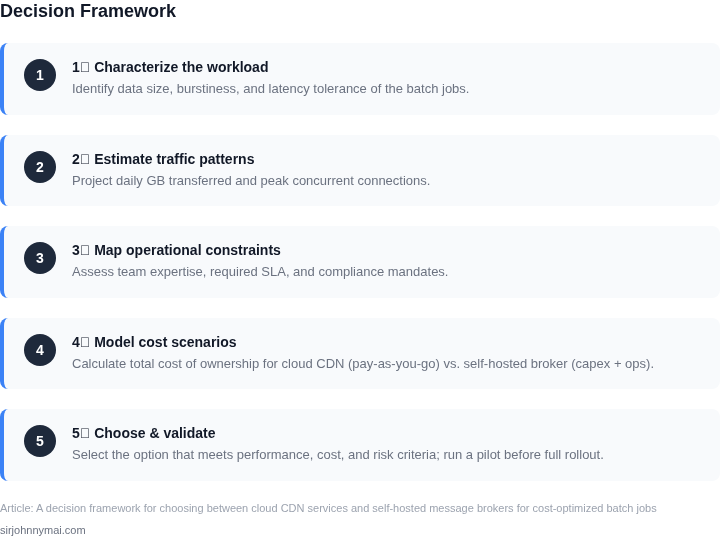
While the decision table provides clear guidance, most organizations will find value in a hybrid approach. This strategy leverages cloud services for their elasticity and self-hosted infrastructure for predictable costs. The key is to identify workloads that fit each model and design a migration path that minimizes disruption.
Phase 1: Identify Workload Candidates
Begin by categorizing your batch jobs into three tiers:
- Cloud-Optimized: Jobs with unpredictable scale, short-lived tasks, or integration needs with other AWS services. Examples include ETL pipelines that process variable-sized datasets or real-time analytics that spike during peak hours.
- Self-Hosted: Jobs with fixed schedules, consistent resource usage, or compliance requirements that prevent cloud migration. Examples include nightly reconciliation reports or legacy systems that require on-premises data access.
- Hybrid Candidates: Jobs that could run in either environment but benefit from cost optimization. These are the most valuable targets for phased migration.
Use your existing monitoring tools—such as Datadog or Prometheus—to analyze historical job metrics. Focus on variables like runtime duration, data volume, and resource utilization. For example, if a job consistently runs for 12 hours with 8 vCPUs but only uses 4 vCPUs for 80% of its runtime, it’s a candidate for cost optimization.
Phase 2: Pilot Migration
Select one hybrid candidate for a pilot migration. Start with a non-critical workload to validate assumptions. For instance, if you’re using AWS Batch for a data processing job, compare its cost against a self-hosted Kubernetes cluster running the same workload.
Track metrics like cost per job, latency, and operational overhead. Use AWS Cost Explorer or your cloud provider’s equivalent to compare actual spend. Document any challenges—such as data transfer costs or setup time—so they can be addressed in the full migration.
Phase 3: Full Migration and Optimization
Once the pilot succeeds, expand the migration to additional workloads. For cloud-optimized jobs, use spot instances or serverless options where possible. For self-hosted jobs, implement auto-scaling policies to match demand.
Monitor the hybrid environment closely. Use tools like AWS Lambda Powertools or Kubernetes Horizontal Pod Autoscaler to adjust resources dynamically. Regularly review cost reports to identify inefficiencies—such as over-provisioned resources or underutilized capacity.
Schedule a 30-minute review with your team to discuss the pilot results and refine the migration plan. Bring metrics like cost savings per workload and any operational insights gained during the pilot.
Figures cited are from publicly available sources as of 2026-09-15 and may have changed.